 Level Best
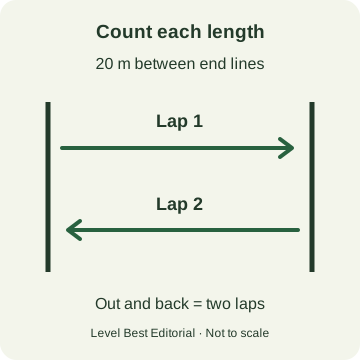
For a 20-metre PACER, one lap is one length of the course. The return journey is another lap. Before a group starts, agree who watches each runner, how misses are recorded and which result belongs on the score sheet. Keep the course distance and recording beside the result.
Brought to you by Level Best. The released app now includes a 20 m PACER test scored in laps, plus squads of up to four runners for free. For practice, a trainer can run the audio and tap each runner’s drop-out. The organiser’s assessment instructions still determine the official score.
Count lengths, not return trips
FitnessGram’s PACER overview describes a progressively faster shuttle test and directs organisers to its official audio. Its standard setup has two lines 20 metres apart; a 15-metre version also exists.
The Cooper Institute’s PACER instruction card, hosted by Hurst-Euless-Bedford ISD, describes each single beep as the end of a lap. A runner goes from one line to the other, then turns for the next lap. Do not wait for them to return to the starting line before counting one.
Give the scorer one clear job
For an informal practice group, use this checklist before pressing start:
- Name the test. Write down the exact protocol, measured course distance and recording. A file labelled only “beep test” leaves too much uncertain.
- Assign a scorer. Make it clear which runner each scorer watches. Use smaller groups if the organiser cannot observe everyone reliably.
- Rehearse the record. Walk through an outward length and a return length. Check that everyone counts them as two laps, then explain how to mark a miss separately.
- Read the stopping and scoring rules. Confirm the required line contact, the treatment of misses and the final score calculation from the current administration instructions.
- Check each entry at the finish. Keep the runner’s result separate from the last lap announced to everyone still running.
This is a practice-organisation checklist, not a replacement for a school’s assessment procedure. The linked Cooper card is dated 2010. For current administration manuals, protocol videos, cadences and score sheets, FitnessGram directs educators to SmartCoach. Its support FAQ also points to the current administration resources. Use those and your school’s instructions to settle scoring details before a formal assessment.
A drop-out tap records a moment in a practice session. It does not decide whether an assessor should count a missed length. Keep any miss record alongside the result and resolve a discrepancy before using it as an official score.
Keep 15 m and 20 m records separate
Do not compare two raw lap counts without checking the course and protocol. A lap on a shorter course covers a different distance, and changing the distance while keeping the same audio changes the task.
Preserve the original result and label it, for example, “15 m PACER” or “20 m PACER”, with the recording used. If your reporting system requires a converted result, use the method required by that system and retain both the original and converted fields. Do not create a score conversion by multiplying laps by a distance ratio.
For practice progress, compare a participant with their own earlier session using the same test, distance and scoring method. FitnessGram describes PACER as a way to support personal progress rather than a competition. A group leaderboard is not a Healthy Fitness Zone assessment or a service-entry pass decision.
A PACER score is not a police or military target
A shared distance does not make two tests interchangeable. Surrey and Sussex’s police policy specifies a 15-metre JRFT and distinguishes recruitment from serving-officer requirements. The British Army’s assessment guidance separates the soldier’s continuous 2 km run from the officer’s 20-metre multi-stage fitness test.
For a US military or recruitment assessment, get that organisation’s current instructions for the exact role and assessment stage. Do not substitute a school PACER table, a UK police target or another participant’s recollection. Our protocol-selection guide explains the checks to make before choosing practice audio.
Save a result you can use next time
Keep a short session record:
- Test name, date, course distance and audio version.
- Participant identifier and score in the required format.
- Miss record and any scoring query to resolve.
- Surface or layout changes that could affect comparison.
For supported practice, Level Best keeps results and personal bests on the phone. Pro adds larger squads and CSV export. Its current App Store listing describes the released capabilities; an export is not a submission to FitnessGram or your recruiting organisation.
Before your next group session, agree the scoring sheet first, then choose the matching test in Level Best. For pacing and turns between assessments, see our running and shuttle-practice guide.
Back to all guides →